Audio-first content like podcasts, online lectures, and interviews can also work as video. But turning audio into video means finding visuals that match what's being said, building scenes, and adding captions and transitions.
When you're working with a long lecture or podcast, just understanding the full content and picking the right scenes takes a lot of time.
That's where AI audio-to-video technology comes in. The AI analyzes the spoken content and assembles images and video footage that fit the context, helping you produce a video.
In this post, we'll look at how AI audio-to-video works, the key features of three popular platforms (Filmora, Pictory AI, and Visla), and what the production process actually looks like.
Why You Need AI Audio-to-Video Tools
Audio content is relatively simple to produce and great for delivering long-form information. But voice-only content doesn't perform well on every platform. On visual platforms like YouTube, content is easier to follow when it comes with images or video that match the narration.
Source: Pictory AI
For example, audio explaining the real estate market could use local maps or footage of buildings, and travel content could show tourist spots and local scenery.
The hard part is putting those visuals together yourself.
You have to split the audio into sections, search for the right images and clips, and sync scenes with the narration, over and over again. The longer the video, the more time and resources editing takes.
3 AI Audio-to-Video Platforms Compared
Filmora, Pictory AI, and Visla are popular tools for turning audio into video. All three can be used for audio-based video production, but their key features and best use cases differ slightly.
✅ Filmora: Audio analysis plus video editing
Filmora is a video editing program that offers an AI Audio to Video feature.
It analyzes podcast or lecture audio to identify key points and helps you build scenes and captions. It's especially useful if you want to pull key moments from long audio and repackage them as short videos.
Because you can refine the output in a full editing environment, it's easy to move on to follow-up work like swapping scenes or styling captions.
✅ Pictory AI: Auto-placing visuals for explainer audio
Pictory AI is a service for creating videos from text and audio.
It transcribes audio to text and builds scenes using stock footage or images related to the content. Its standout strength is that you can create a video draft with visuals that match the narration, even if you don't have much filmed footage.
Source: Pictory AI
For example, you can use it to turn educational audio or knowledge content into videos with visual explanations. It's a good fit for people who want to make explainer videos without appearing on camera.
👉 Best for: Educational videos, knowledge content, narration-driven explainers
✅ Visla: Auto-generated video drafts from audio
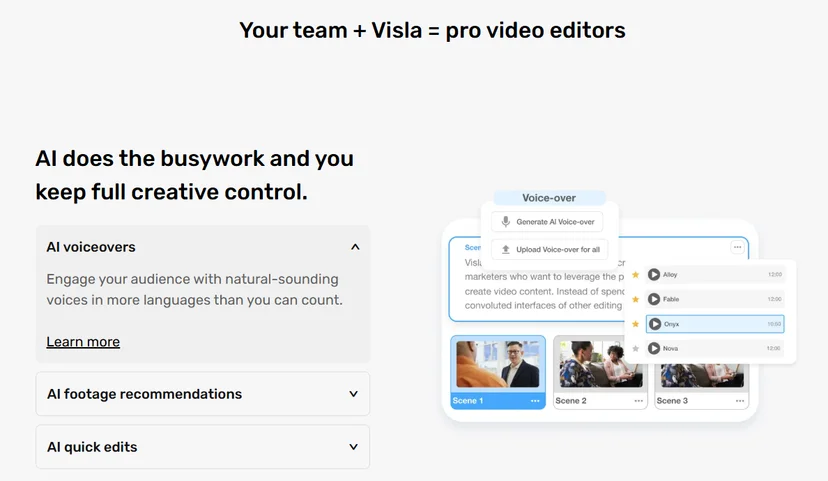
Visla is a platform for AI-powered video creation and editing.
It generates video drafts from audio content and assembles related images and footage. You can use it to turn voice-driven content like podcasts or educational recordings into visual videos.
With AI Director Mode, you can build a storyboard before generating the video, share work with teammates, and use comments, co-editing, and version control.
👉 Best for: Online course content, corporate explainer videos, turning podcasts into video
💡
How They Differ from HeyGen and Synthesia
HeyGen and Synthesia are AI video tools that are also used for voice-based content.
✔ However, both focus mainly on creating videos where an AI avatar speaks a script or voiceover.
✔ Filmora, Pictory AI, and Visla, on the other hand, build relevant visuals and scenes based on what's said in the audio.
So choose your platform based on whether you need a video with a virtual presenter or a video that shows a variety of scenes matching the narration.
How to Use AI Audio-to-Video Tools
Each AI audio-to-video service has its own interface, but most follow the same four-step process.
1️⃣ STEP 1. Prepare your audio file
First, prepare the audio file you want to turn into a video. You can use content you've already made, such as podcast recordings, online lectures, or interviews.
2️⃣ STEP 2. AI speech analysis
Once you upload the audio, the AI transcribes it and analyzes the content. It identifies topics and key points in the transcript and extracts the information needed to break the video into scenes.
Depending on the service, you can turn the entire audio into a video, or extract key quotes to create short videos. This step determines what goes into the video and how scenes are structured.
3️⃣ STEP 3. Auto-assemble related images and footage
Based on its analysis, the AI places relevant visuals. For example, a marketing lecture might get scenes related to ads or digital platforms, while a travel podcast might get footage of destinations and landmarks.
Depending on the service, it may automatically recommend stock footage and images, or generate new visuals with AI.
During this step, you can set the aspect ratio, style, and caption design, and the AI builds a video draft that follows the flow of the audio.
4️⃣ STEP 4. Review and edit
Even when AI generates the video automatically, you still need to review the final result.
Check that no irrelevant images were used, that captions are accurate, and that scene transitions feel natural.
Pay extra attention to content with technical terms or proper nouns, since speech recognition can make mistakes. If needed, swap out images and footage or adjust captions and scene length to improve quality.
When editing is done, export in the aspect ratio and file format that fit the platform you're posting to, such as YouTube or Instagram.
What Kind of Content Works Best with AI Audio-to-Video?
AI audio-to-video is useful for extending existing audio content to video platforms. It works especially well for the following types of content.
① Turning podcasts into video
You can add related images, footage, and captions to an existing podcast to create YouTube content. It's a way to bring audio-only content to new platforms by adding visuals.
② Online lectures and educational content
You can add supporting images and footage to lecture audio. Visuals are especially helpful for viewer understanding when explaining technical concepts or information.
③ Corporate and brand informational content
You can repurpose company interviews or product explainer audio into video content. Without a separate shoot, you can use existing audio and images to create brand intro videos or informational content.
④ Short-form content
You can also pull key moments from long podcasts or lectures and turn them into YouTube Shorts or Instagram Reels.
💡
Keep in mind that not every AI audio-to-video service can automatically extract key moments. So if you want to turn long audio into short videos, check whether the tool supports highlight extraction. Using a dedicated AI tool that turns long-form content into short-form may be more efficient.
AI audio-to-video technology helps you extend existing audio content into new video content.
By automating transcription and the assembly of related images and footage, it cuts the time and effort needed to produce a video.
If you already have podcast or lecture audio, try an AI audio-to-video tool to expand it into YouTube videos, short-form clips, and more.